
Automating company data enrichment: How we reduced 10,000 manual 12 minute tasks to 21 seconds each
A plumbers merchant client had 10,000 email addresses from 24,000 contacts. Only 4% included company names. The rest were domains.
They needed company data to segment customers, categorise by filing type, find director names, and run credit checks for pre-approved trade account offers.
The manual process would have taken 5 months to 1.5 years. We built an automated solution that processes each record in about 21 seconds on average.
Why company data matters for B2B segmentation
The client had been trading through a B2B portal for years. They never captured proper company details at the point of purchase. The dataset was messy: sole traders, micro businesses, free email domains, typos, and alias domains all mixed together.
The business goal was commercial, not “data for the sake of data”:
- Segment customers by size: Companies House filing type indicates whether a business is micro, small, medium, or large. A micro-entity filing tells you something different from a full accounts filing.
- Pull director names and addresses: Sales conversations go better when you know who you’re talking to. Director data provides context for outreach.
- Credit check and offer pre-approved trade accounts: Once you have structured company data, you can run credit checks and proactively offer trade terms to qualified customers.
For this client, the time delay was the bigger problem than the wage bill. Segmentation is only valuable when it can change behaviour this quarter. Waiting a year defeats the purpose.
The scale problem that breaks manual processes
Each company has a domain. Finding the company number requires visiting the website and checking the footer, about page, or terms for the Companies House registration number.
Why this automation is possible in the UK
UK limited companies are required to disclose certain details on their websites, including the registered name and registration number. This comes from the Company, Limited Liability Partnership and Business (Names and Trading Disclosures) Regulations 2015.
In practice, you often find it in the footer, the terms, the privacy policy, or an “About” page. That legal requirement makes this automation possible. It does not make it clean.
This approach would not work the same way in other countries. The UK’s disclosure rules create a consistent data source that an AI agent can locate and extract.
The manual process
A person can do this manually:
- Search for the company by domain and trading name.
- Visit the website.
- Find the registered company name and number.
- Look up the company on Companies House.
- Pull directors and core company details back into a spreadsheet or CRM.
Finding the company number takes 3-5 minutes per company when done in batches. Pulling director details manually adds another 10 minutes when you need names, roles, and addresses in a structured form.
Call it 14 minutes per company at worst case. 5 minutes at best. The average sits around 12 minutes when accounting for the mix of quick finds and deeper research needed.
The maths that makes automation the default choice
Assumptions: 220 working days per year, 8-hour days, 15 minutes per record.
- Tasks per hour: 4
- Tasks per day: 32
- Tasks per year: 7,040
For 10,000 records: 312.5 working days, or about 1 year and 5 months.
Even at 5 minutes per record: 104 working days, or about 5 months.
In cost terms, that’s £31-32k for the longer process or £10.6k for the faster one. Both figures exclude employer NI, pension contributions, recruitment fees, and management overhead.
Plus you’re waiting 5 months to a year and a half for results.
The automation solution: AI agents plus APIs
We combined AI agents with automation tools to handle the research and data extraction.
The system uses n8n for workflow orchestration, GPT-5-mini for intelligent web research, SearchAPI for Google search results, and the Companies House API for structured company data.
The agent checks websites and Google search results to find company numbers. Once found, it enriches the record with Companies House data including directors, addresses, filing status, and financial information.
Understanding the tool stack
To build this, we tied together four distinct technologies that each play a specific role in the enrichment loop:
- n8n: This is the “glue” or workflow orchestrator. It is a powerful automation tool that allows you to connect different apps and APIs using a visual interface. Unlike simple tools like Zapier, n8n allows for complex logic, error handling, and self-hosting, which gives us total control over the data and the execution costs.
- Companies House: This is the UK’s official registrar of companies. Every limited company in the UK must register here. Their API provides the “ground truth” data that makes the enrichment reliable: registered names, addresses, registration dates, filing history, and director details.
- SearchAPI: This tool gives our AI agents a “window” to the live web. It allows the system to perform Google searches programmatically and return structured results. While we used it for company lookups, SearchAPI can also scrape local maps results, monitor real-time news, track product prices on Amazon, or extract data from YouTube and LinkedIn. It transforms the unstructured web into a data source an AI can process.
- Notion: We used Notion as our documentation and collaboration hub. It houses the “instruction manual” for the project, allowing the team to manage headers, status reporting, and troubleshooting guides in one place. Notion acts as the bridge between the technical workflow and the business operators.
Why SearchAPI matters for accuracy
We did not want the model making up a company number from partial clues.
SearchAPI gives you search results deterministically. The agent reads those results, then decides what to look at next. That constraint pushed accuracy up. It pushed token use down too, because we were feeding it relevant pages instead of letting it ramble.
Why we chose this tool stack
We installed n8n on a £10 per month Digital Ocean droplet using Docker. This setup provides a private, scalable environment for under the cost of a few lunches.
OpenAI’s GPT-5-mini operates on pay-as-you-go pricing. SearchAPI costs £40 per month. Companies House API keys are free from the Companies House developer portal.
Total infrastructure cost: £50 per month plus OpenAI usage. The alternative was hiring someone for 5-18 months at £10-32k plus overheads. The automation pays for itself quickly.
The two-agent architecture explained
We built two agents in the workflow, not one. A deep research prompt run on every record is a waste when many records are easy.
The processing decision tree
The enrichment workflow follows a deliberate sequence with multiple decision points:
- Email filtering: Does the record use a proper business domain? Free email domains (Gmail, Hotmail, Outlook) are flagged early and excluded from expensive processing.
- Domain discovery: If a business domain exists, extract it from the email. If not, check for a company name and search Google to find the domain.
- Agent 1 (fast pass): Attempt to find the company number quickly from obvious sources.
- Agent 2 (deep pass): Only triggered if Agent 1 fails. Broader search, more token usage, confidence scoring.
- Companies House lookup: Once a company number is found, call the official API for structured data.
- Website analysis: Fetch the homepage and analyse for business indicators.
- AI classification: Determine business type, fit, and confidence based on all available evidence.
Each decision point either advances the record or routes it to a fallback path. Records that cannot be matched after both agents are marked “Attempted not found” rather than left hanging.
Agent 1: the fast pass
Agent 1 takes the domain and any name hints, scans likely pages, and tries to extract a company number quickly. Its prompt was basic. It found more company numbers at one-third the token count of the deeper agent.
The best surprise in the whole build was Agent 1. We added “company number found” to its structured output. If it finds a company number, we bypass Agent 2 completely.
Agent 2: the deep pass
Agent 2 only runs when Agent 1 fails. It uses broader search results plus website scraping to find a reliable match. It costs more tokens but handles the harder cases: trading names, group brands, and sites with buried legal footers.
Why the company number is the pivot point
Companies House data is structured. Your CRM can handle it.
The unstructured part is the web: trading names, old domains, parked sites, and “contact us” pages with no legal footer.
The system is built around that pivot: spend tokens to discover the number, then stop “thinking” and switch to an API.
Architecture decisions that made debugging possible
We built two workflows instead of one monolithic process.
The input workflow feeds the main enrichment workflow one record at a time. Each execution gets a unique execution ID logged to the Google Sheet.
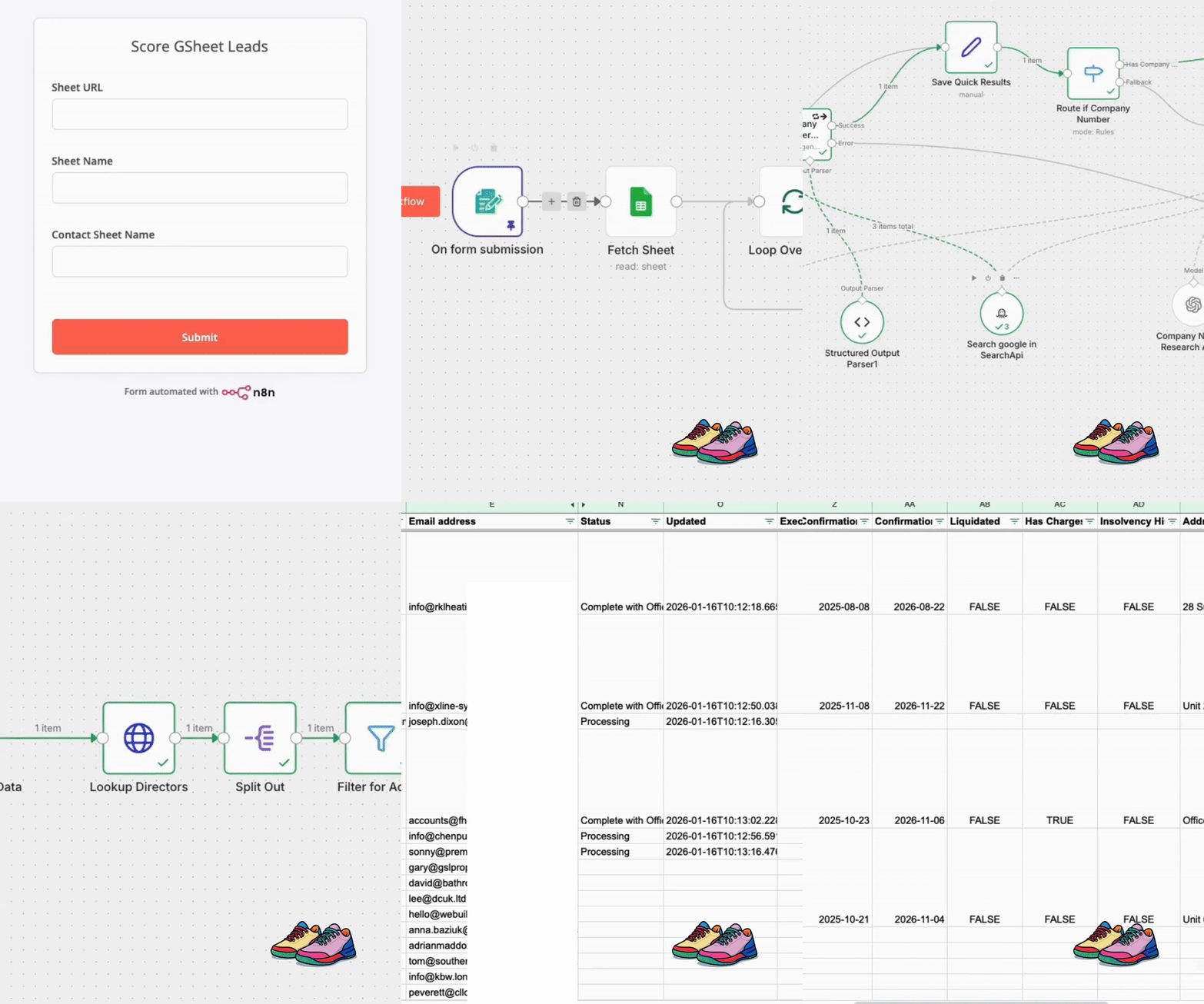
This separation makes debugging manageable. n8n’s batching and execution model makes it difficult to debug multiple runs in a single workflow. By feeding records individually with logged execution IDs, we can trace exactly what happened to each record.
API key rotation
The input workflow handles API key rotation. Companies House rate limits are 300 requests per minute by default. We need multiple API keys to process records quickly without hitting limits.
We kept a pool of API keys. Each incoming record selects the next key, then passes it into the HTTP request. That sounds like a small change. It removed the rate limit as the blocker, then surfaced the next blockers, like timeouts and bad domains.
The input workflow rotates through API keys as it feeds records to the main workflow. This keeps us under rate limits while processing multiple records simultaneously.
Why code nodes instead of pre-built modules
We initially built a Companies House n8n module based on a simpler version found online. But we needed more than one API key to handle the volume.
Pre-built modules typically use a single API key configured in credentials. We needed dynamic key rotation per execution.
Using HTTP nodes with code nodes lets us rotate API keys programmatically. The code node selects the next key from our pool and passes it to the HTTP request.
This flexibility matters when you’re processing thousands of records and need to stay within rate limits.
The model progression: from GPT-5.2 to GPT-5.1-mini
This build took 27 hours end-to-end. At least half of that time went on prompt tuning and agent behaviour, not on wiring up n8n nodes.
Starting with a larger model
We started with a prototype agent using GPT-5.2 because it made debugging prompt logic faster. It was quick to validate the approach, though it was expensive per record.
Stepping down to reduce cost
We stepped down to GPT-5.1 to reduce cost. It was slower than we wanted for bulk runs, and we burned about £30 in an afternoon running tests while tuning.
Landing on GPT-5.1-mini
We then moved to GPT-5.1-mini and tightened the prompts so the agent only returned structured data, without asking follow-up questions. This workflow is not a chat, so any “please provide…” output is just wasted tokens.
ChatGPT helped optimise its own prompts
Interestingly, ChatGPT helped us optimise our own prompts. We fed the long-winded instructions into ChatGPT and asked why the token count was so high. It pinpointed exactly where we were being redundant.
The final lesson here is not “use a smaller model”. It is “make the output contract strict, then stop early once you have evidence”.
Cost optimisation: from 25p to 2.855p per lead
Early testing showed costs around 25p per lead. At 25p, that’s £2,500 for 10,000 leads. Not terrible, but watching costs spike during bulk processing felt unsustainable.
We spent a couple of hours refining prompts and investigating token usage.
What changed
We tuned two things:
- Prompt order and structure, so the agent stops as soon as it has enough evidence.
- Model choice, trading raw capability for predictable structured output.
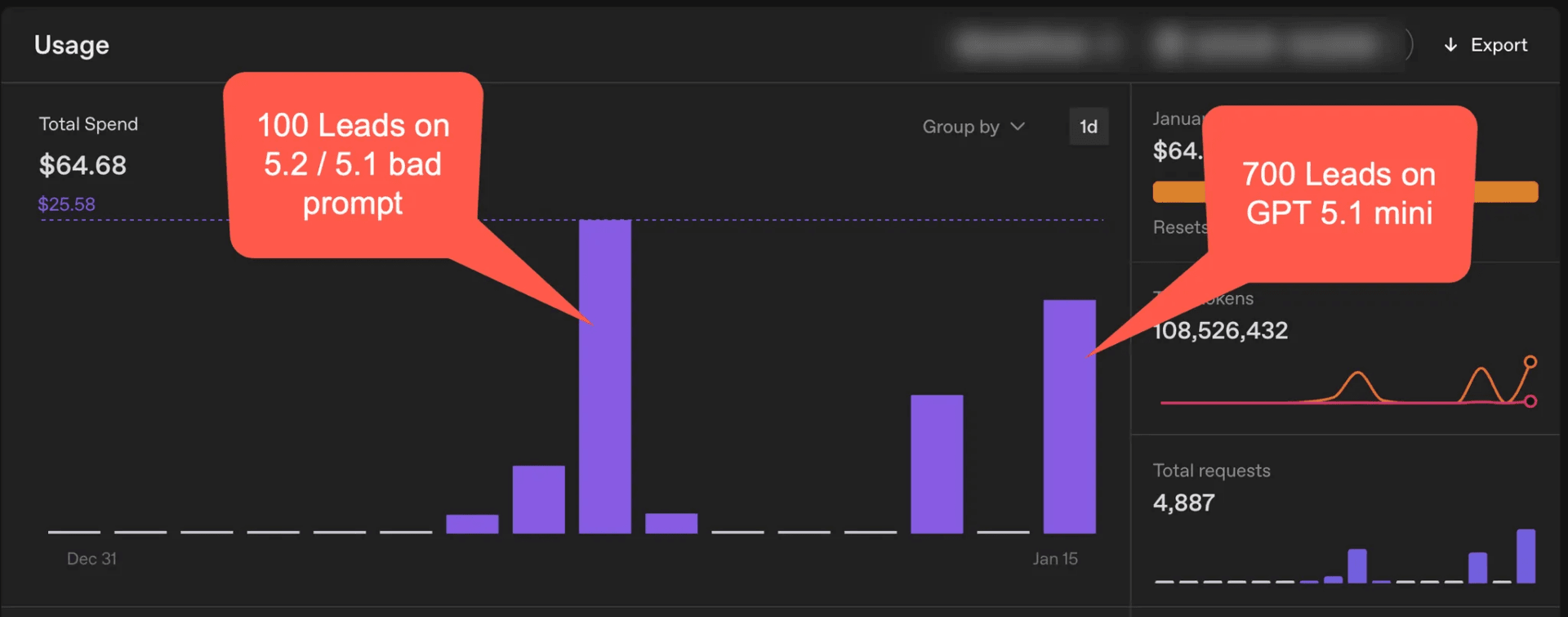
The shift came from restructuring the prompt logic and ensuring the order of operations was correct. Improving the output structure reduced costs further.
Costs dropped from 25p per lead to 2.855p per lead. Nearly one-tenth of the original cost. For 10,000 leads, that’s £285.50 instead of £2,500. The difference covers infrastructure costs multiple times.
The prompt logic that kept the agent honest
While we didn’t publish the full prompts (they contain internal operating rules and client-specific details), the shape of the logic is what matters.
The prompt structure
Input:
- domain
- company hint (if present)
- person name hints (if present)

Task:
1) Use SearchAPI results to find the company website and legal disclosure page.
2) Extract company number only when found in a valid disclosure context.
3) Return JSON only:
   - company_number
   - company_name
   - confidence
   - reasoning_notes (short, evidence-based)
Stop as soon as the company number is confirmed.
The most important rule was the stop condition. Without it, the agent would keep “explaining” its findings, wasting tokens on every record.
What breaks in practice: edge cases and bad data
You see these patterns quickly when processing real-world B2B data:
Domains are not company identifiers
- A domain maps to a group brand, yet the purchaser is a local branch with a separate company number.
- The website is a brochure site for a trading name. The limited company details are buried or missing.
- The domain is parked, expired, or points at a marketplace profile.
- The domain is fine, yet the email address is a free domain and the “company” is a sole trader.
Free email domains slip through
In trades and building supplies, you get plenty of sole traders and micro businesses using Gmail or Hotmail. These are not limited companies. The system needs to recognise this and mark them appropriately rather than searching forever.
Why we excluded free email domains from this project
The original dataset had 28,316 unique customer records after deduplication. Of these, 11,158 used proper business email domains. The remaining 17,160 used free email providers like Gmail, Hotmail, and Outlook.
We tested the free email customers with representative samples. Results confirmed what you would expect in trades: most were sole traders, dormant businesses, or B2C customers with no Companies House registration to find.
We recommended focusing enrichment on the 11,158 business domain records. The reasoning:
- Better quality data: The domain is already there. No guesswork needed.
- Active businesses: Companies paying for business email are operational and investing in infrastructure.
- Higher conversion potential: These are more likely to be qualifying trade accounts.
- Lower cost: Eliminating 15,000-17,000 unnecessary Google searches reduces API spend significantly.
- Faster delivery: Processing 11,000 records instead of 28,000 means results arrive sooner.
- More reliable results: Starting with verified business domains gives better Companies House match rates.
The free email records were excluded entirely rather than processed with lower expectations. The effort required to research each one, combined with the high likelihood of finding dormant or unsuitable businesses, did not justify the cost.
Trading names vs registered names
A business might trade as “Smith Plumbing” but be registered as “J Smith Services Ltd”. The agent needs to find the registered name, not the trading name.
The system needs a confidence model and a fallback path. Chasing edge cases destroys the economics. If a row would take 30 minutes of human effort to fix, it is not worth it when the baseline manual task was 5 to 14 minutes.
Operating the system: statuses, confidence, and batching
This project worked because we treated Google Sheets as a queue and an audit log, not a spreadsheet.
Batching strategy
The full dataset was ~11,000 rows. We ran it in smaller sheets of under 1,000 rows. That kept error handling simple and kept debugging practical.
Status values and what they mean
| Status | What it means |
| Processing | The row has been queued and picked up |
| Complete | A company match was found and the company fields were written |
| Error | A known error occurred and the row was marked for review |
| Attempted not found | The system could not find a reliable match after both agents |
Confidence scoring
Items with a confidence score have gone through Agent 2 (the deep research agent). The scores are:
- Highest: Strong evidence from multiple sources
- High: Clear evidence from a single authoritative source
- Medium: Reasonable match but some ambiguity
- Low: Weak evidence, may need manual review
- None: No reliable match found
Items without a confidence score went through Agent 1 (the fast pass) and found a company number quickly. Agent 1 does not do confidence scoring but does add reasoning notes.
How the AI determines confidence
Confidence is not calculated from field population. A record with all fields populated is not automatically “high confidence”.
The AI determines confidence based on prompt consistency: how reliably the same evidence points to the same conclusion across different search results and page sources. If the company number appears in the footer, the terms page, and the Google search result, that is higher confidence than finding it in a single location.
This approach matters because field population alone does not indicate data quality. A record with a company number found on a parked domain should score lower than one confirmed across multiple authoritative sources, even if both records end up with the same Companies House data.
What to do when rows get stuck
Some rows get stuck in “Processing”. The common causes are timeouts, upstream throttling, or garbage inputs.
The pragmatic rule we used:
- If you care about the row, clear the status and rerun it once.
- If it fails again, mark it for manual review and move on.
What the enriched data looks like
Once the system finds a company number, it fetches structured data from Companies House.
What Companies House provides (and what it does not)
Before building, it is worth understanding the boundaries of the Companies House API. It provides excellent structured data for registered companies, but it has gaps.
Available from Companies House:
- Company name (registered, not trading name)
- Company number
- Company status (active, dissolved, etc.)
- Registered address (full)
- SIC codes (primary industry classification)
- Incorporation date
- Filing history and accounts dates
- Director and officer details
Not available from Companies House:
- Company size (employee counts or turnover bands)
- Trading address (if different from registered)
- Additional contact details (phone, email)
- Website URL
The API returns the primary SIC code but not its description. You need to look that up separately from the Companies House SIC code reference.
Website URLs require a separate discovery step. The AI agent attempts to locate these via Google search during the enrichment process. This is best-effort location, not validation in the traditional sense.
Company data fields
- Company Type
- SIC Codes (industry classification)
- Company Name
- Company Number
- Company Status
- Accounts Made Up To
- Accounts Next Due
- Last Account Type
- Confirmation Last Made Up
- Confirmation Next Due
- Liquidated (yes/no)
- Has Charges (yes/no)
- Insolvency History
- Address (Line 1, Line 2, Country, Locality, Post Code, Region)
- Reasoning Notes
Director and officer data
The system writes director data to a separate sheet, one row per person:
- Company Name
- Company Number
- Person Number
- Name
- Role
- Appointed Date
- Address (Premises, Line 1, Line 2, Country, Locality, Post Code, Region)
- Date of Birth (month and year only)
- Nationality
This structure means you can import directors directly into a CRM as contacts linked to their company record.
Tools and setup: what you need to replicate this
The system requires:
- n8n: Free version on a £10/month Digital Ocean droplet. Follow the Docker installation guide in n8n’s documentation.
- OpenAI API: Pay-as-you-go access to GPT-5-mini. Costs scale with usage.
- SearchAPI: £40 per month subscription for Google search results. SearchAPI website
- Companies House API: Free API keys from the Companies House developer portal.
- Google Sheets: For input data and results tracking. A template is available with the required column structure.
The workflow reads from a Google Sheet, processes each record through the AI agent, enriches with Companies House data, and writes results back to the sheet.
Results: 21 seconds per record on average
In testing, 500 tasks completed in 3 hours. That’s an average of 21 seconds per record with parallel processing.
Per-record wall clock time varied based on what the agent had to do. Easy wins complete fast. Hard cases require multiple page reads and more API calls.
At this rate, 10,000 records would complete in about 60 hours of processing time. That’s 2.5 days of automated work compared to 5-18 months of manual effort.
The cost breakdown
The processing cost per lead sits at 2.855p. For the initial 10,000 leads, that’s £285.50 in processing costs.
The client has 40,000 more leads available. These 10,000 were the highest priority and most recent, so we started there. At the build cost for this batch, they’ve enriched these leads with complete company data for less than 60p per lead.
As they process the remaining 40,000 leads, the build cost amortises across all 50,000 records. The long-term cost per lead drops further.
Compare that to £10,600 to £32,000 for manual processing of just 10,000 leads, plus the time delay of 5-18 months.
The business outcome
The value was not “we enriched a spreadsheet”. It was:
- Segmentation by company type and filing signals
- Director context for sales conversations
- A cleaner route to credit checking and trade account offers
Lessons learned from 27 hours of development
Building this took 27 hours. At least 50% of that time was spent refining prompts and testing different agent configurations.
Use AI for discovery, not for clean data
The model is there to find the company number from the messy web. Once you have it, stop “thinking” and call an API.
Design for the ugly cases from day one
Free email domains, parked sites, typos, trading names, and merged companies are not edge cases in trades and building supplies.
A good system needs:
- A confidence score
- Evidence notes
- A clear “not found” outcome
- A rerun path
Logging is the part you will wish you built earlier
Execution IDs in the sheet turned this from a weekend prototype into an operator-friendly system. Without that, you spend your time staring at a workflow run and guessing which row caused it.
Optimisation comes from stopping early
Model choice matters, yet the larger win was prompt design that stops once it has evidence. That shift took costs from “fine on a small test” to “comfortable at 10,000 records”.
What this means for B2B businesses with similar challenges
If you have customer data that needs enrichment, automation with AI agents can turn months of manual work into days of processing.
Breaking the problem into steps matters: research, extraction, enrichment, validation. Each step can be automated with the right tools and expertise.
Cost optimisation comes from prompt engineering and model selection. The 27 hours spent refining prompts and testing configurations reduced costs by nearly 90%. That investment pays off when processing thousands of records.
Architecture matters for debugging and scaling. Two workflows with execution logging make it possible to trace issues and handle errors gracefully. This becomes critical when processing large batches.
For this client, the system is built. They can now process their remaining 40,000 leads using the same infrastructure, spreading the build cost across all 50,000 records.
The reusable design advantage
The first spreadsheet upload functions identically to the thousandth. This is deliberate.
A common mistake with automation projects is building for a single batch and then paying again when the next batch arrives. We designed this system to be repeatable from day one.
The client can upload a fresh CSV of new customers, run the same enrichment workflow, and get the same structured output. No additional development. No re-engagement. The process documentation, status reporting, and troubleshooting guides live in Notion, allowing their team to self-manage ongoing enrichment.
This is what separates a one-time automation project from an operational capability. The build cost is paid once. The value compounds with every subsequent batch.
The question worth asking
If a task takes 14 minutes manually and you have 10,000 of them, automation isn’t optional. It’s the only way to get results in a reasonable timeframe.
This project delivered results in days instead of months. The client paid proper money for a solution that works. They got enriched data for less than 60p per lead on the initial batch, with the ability to process 40,000 more leads using the same system.
The tools exist. The APIs are available. The expertise to combine them effectively requires experience with prompt engineering, workflow architecture, and cost optimisation.
The barrier is recognising that manual processes have limits. Investing in automation pays off when you have scale. For businesses with thousands of records to process, the return on investment is clear.
